
When an investor Googles your name, what do they see? Effective startup digital footprint management means auditing the branded results Google actually shows, fixing the pages and identity signals you own, using Google's controls for snippets and removals, and re-checking on a schedule. You cannot hand-pick everything, but you can keep what customers, investors and hires find accurate.
- You can influence snippets, but Google builds them automatically from page content and can show different text for different queries.[2]
- Temporary hiding in Search Console lasts about six months and does not delete content from the web.[3]
- Manual brand searches vary by time, place, device and search history, so pair them with Search Console query data.[1]
- Consistent names, URLs, logos and profiles, plus Organization markup, help Google understand who you are. They do not guarantee a knowledge panel.[4]
What Google shows about your startup
Your footprint includes active traces you publish and passive traces others publish about you. Active traces include your website, social media, content marketing and ads; passive traces include reviews, analytics, public records and news mentions.[6]
Search these name variations and record what ranks. Include every market and language where your startup operates:
- Legal entity name and trading name or DBA
- Product names and flagship feature names
- Founder names combined with your startup name
- Common misspellings and abbreviations
- Old domains, pivoted names and acquired domains
- Country and language variations
Expect more than blue links. Your results may include business profiles, directory listings, reviews, news articles, LinkedIn and X profiles, videos and images.
Active vs. passive results
Active results are pages you can edit directly, such as your homepage, pricing page, documentation, blog, careers page and LinkedIn company page. Passive results live elsewhere, such as a directory entry with old funding data, a review, an old press article or a former domain that still resolves.
You can update active pages yourself. For passive pages, contact the publisher, request a correction at the source, or use an eligible Google tool if the content is gone or qualifies under a policy.[3]
Audit your footprint and set a baseline
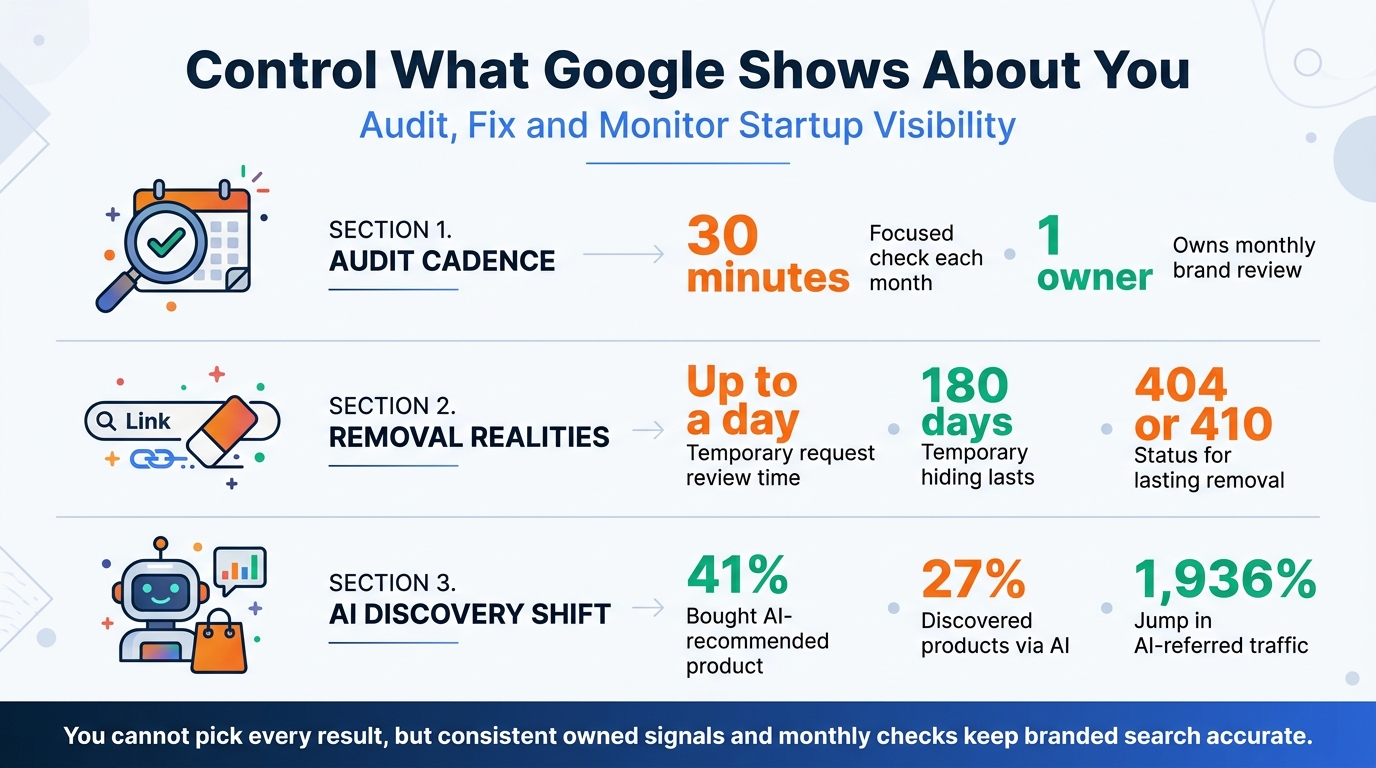
Block 30 minutes and run the same check every month. A repeatable process makes it easier to spot changes while you focus on building the product.
- Private-window brand searches. Search each name variation in a private window. Record the top 10–20 URLs, who owns each result, the snippet text and the date. Results vary by time, place, device and recent search history, so treat this as a snapshot rather than a universal ranking.[1]
- Search Console Performance baseline. Open Performance in Search Console for your property. The default view shows clicks and impressions from the past three months.[1] Review clicks, impressions, CTR (clicks divided by impressions) and average position (the average position of your site's topmost result).[1] Segment the table by Queries, Pages, Countries, Devices, Search appearance and Dates to see which searches show which pages. Use Daily to spot spikes and Weekly or Monthly to follow trends.[1] The newest data can be preliminary, and chart and table totals may differ because they use different aggregation.
- Triage every URL. Assign each result to one action so nothing sits in limbo:
| Triage category | Example | Next action |
|---|---|---|
| Keep and improve | Homepage ranks well but the snippet is vague | Improve the description and page copy |
| Fix an inaccuracy you control | Pricing or team page is outdated | Update the page and check it in Search Console |
| Outdated on a third-party site | Directory shows an old logo or dead link | Contact the site owner |
| Sensitive or policy-eligible | Exposed personal data or a security issue | Assign a legal or privacy owner |
| Gap with no owned result | No owned page appears for a founder-and-startup search | Publish or improve a relevant page |
What to record in one sheet
Create a sheet with columns for query, ranking URL, owner (owned or third-party), accuracy, action, team owner and due date. Save screenshots and export your Search Console Queries and Pages data as a baseline. Compare the same queries next month to spot new results or CTR drops.
Startup Search Footprint Statistics for Founders
Fix pages and signals you control
Start with snippets. Google creates them automatically from page content and may use your meta description when it considers it a better summary for a query. It can show different snippets for different searches, so a meta description is not a guaranteed script for the result.[2]
Write a unique, accurate description for each important page, starting with your homepage and most popular pages if time is short. Keep the visible page copy consistent with the description, since Google may select text from the page instead. You cannot manually choose a snippet for your site; use nosnippet to suppress one, max-snippet to limit its length, or data-nosnippet to exclude a specific section when needed.[2]
A consistent, claimed directory profile with the same name, website URL and social links is one result you can maintain. For founders working to build visibility and backlinks, a StartupRanking profile is another place to present accurate company information.
Entity-consistency checklist
Google needs clear signals to distinguish your startup from others with similar names. Align your details across your website, LinkedIn, directory profiles and app stores:
- Use the same organization name and alternateName, canonical website URL, contact details and sameAs links to official social and review profiles.
- Use the same logo file, at least 112x112 pixels, that is crawlable and indexable.[4]
- Add Organization markup to your homepage or About page, using the most specific applicable subtype. Include only properties that apply; there are no required properties.[4]
- Validate the markup with the Rich Results Test and check how Google sees the page with URL Inspection.[4]
This markup can help Google understand your organization and its administrative details, but it does not guarantee a rich result or knowledge panel.[4] Keep the markup aligned with the information visitors see on the page.
Handle results you do not control
The Removals tool affects Google Search only; it does not delete content from the internet or other search engines.[3] It is for URLs on a Search Console property you own.
For a URL you own that needs urgent hiding or a snippet refresh, submit the exact URL in the Removals tool as a temporary removal or clear-snippet request. Requests usually take up to a day, and acceptance is not guaranteed.[3]
A successful temporary removal lasts about six months, also described as 180 days, after which the URL can appear again.[3] For lasting removal, remove or update the content so the page returns a 404 or 410 status, restrict access, or add noindex. Do not use robots.txt as a blocking mechanism or rely on the Removals tool alone.[3]
For third-party pages, use Refresh Outdated Content if the content is gone or has changed. If it is still live, contact the site owner to correct or remove it at the source.[3] That is the difference between temporary suppression and permanent cleanup at the source.
For sensitive, legal, privacy or security issues, assign a legal or privacy owner and preserve evidence with dated screenshots and URLs. Follow the relevant policy-based removal route rather than treating the site-owner tool as a solution for every case.
Keep the footprint accurate month after month
Assign one owner and review monthly. Re-run brand searches, check Performance for new brand impressions or CTR drops in Queries and Pages, and log changes.[1] Between audits, refresh owned content, respond to reviews, update directory and social profiles, and resubmit your sitemap after major changes.
In a 2026 Klaviyo survey of 7,998 consumers across eight countries, 41% had purchased an AI-recommended product in the previous six months, and 27% said AI introduced them to products they later researched further. Separately, Klaviyo platform data showed AI-referred traffic from sources such as ChatGPT and Gemini rose 1,936% year over year.[5]
“Consumer perception around AI is evolving quickly, and that shift is forcing brands to be more intentional about how they engage their customers,” said Andrew Katz, CMO of Athletic Brewing Company. “AI gives us better insight into what’s actually resonating in the attention economy. But creativity is still human. If you let AI do all the thinking, it feels inauthentic, and consumers can tell. For us, AI is a tool to listen, learn, and adapt faster — but the ideas and storytelling come from our teammates.”[5]
Treat these discovery shifts as a reason to keep company facts consistent and content genuinely useful. When your name, pricing, founders and product details match across owned pages and trusted profiles, people have a clearer picture of your startup.
Conclusion: control what you can, track what you cannot
Audit your brand SERP alongside Search Console, improve the pages and identity signals you own, and use Google’s temporary hiding tools correctly. Fix lasting issues at the source and keep monitoring on a monthly rhythm. This gives a small team a practical way to stay credible with investors and qualified leads without chasing every mention.
If your audit finds a gap, consider claiming and enhancing your profile. A StartupRanking Premium Profile offers an ad-free enhanced page with do-follow links.