
For a contractor, an agency or a clinic, the estimate is usually the first document a client is asked to approve. It sets out the scope, the expected price and the terms of the work, and until the client signs it, nothing gets scheduled. The hold-up is rarely the price itself. It sits in the steps between "this looks fine" and a signed copy: printing, signing, scanning and emailing the document back.
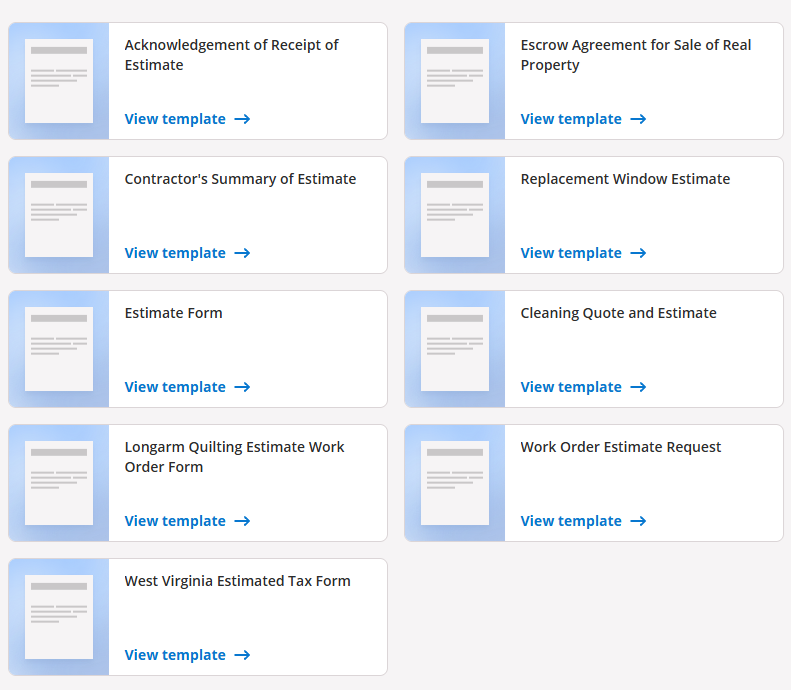
Moving that approval online removes most of those steps. Instead of building every estimate from scratch, many small businesses start from a ready-made form, such as those in signNow's Estimate Templates library, then fill it in and send it for signature from the same place. This guide covers what an estimate should contain, how electronic signatures apply to it under U.S. law, and how the workflow plays out in a few common industries.
Estimate, quote or bid: what the client is actually approving
An estimate is an informed approximation of what a job will cost, based on what the business knows before work starts. A quote is a fixed price for a defined scope, usually valid for a set period. A bid is a price submitted in competition with other providers, common in construction and public contracts.
The labels are often used loosely, so the wording inside the document matters more than the title at the top. When a client signs an estimate, they typically confirm the scope, the pricing basis and the conditions under which the final amount may change. When they sign a quote, they are usually accepting a firm price. If you expect costs to move, say so in writing, and say how the client will be asked to approve any increase.
What a signable estimate should include
A good estimate answers the questions a client would otherwise send by email. At minimum, it should carry:
- Business and client details: legal names, contact information and, where your state requires it, a license number.
- Scope of work: what is included, in plain terms, and what is not.
- Line items: labor, materials and fees listed separately, with quantities and rates.
- Assumptions: site conditions, client-supplied materials or access the price depends on.
- Validity period: the date after which the price must be rechecked.
- Payment terms: deposit, milestones and accepted payment methods.
- Change process: how extra work is priced and approved.
- Signature and date fields for the client and, if needed, for your business.
Exclusions and the change process are the easiest items to skip, and they are what both sides will look for if the final bill differs from the estimate.
Are electronically signed estimates legally valid?
In the United States, two laws cover most electronic signatures. The federal ESIGN Act states that a signature, contract or other record "may not be denied legal effect, validity, or enforceability solely because it is in electronic form." At state level, the Uniform Electronic Transactions Act (UETA) has been adopted by 49 states, the District of Columbia and the U.S. Virgin Islands. New York, the exception, applies its own Electronic Signatures and Records Act.
Estimates are not among the documents ESIGN excludes, which are mainly wills, family-law matters, court documents and certain consumer notices such as utility shutoffs and foreclosures. Two conditions matter in practice. If a law requires information to be given to a consumer in writing, the consumer must agree to receive it electronically. And the signed record has to be kept in a form that can be accurately reproduced later. This is general information, not legal advice.
The fill-and-sign workflow, step by step
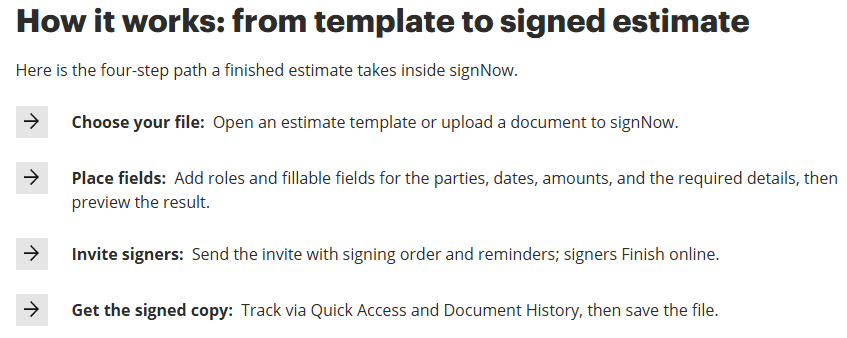
Most eSignature tools follow the same sequence, and signNow's template pages sum it up in one line: "Pick a template, customize it, and send it for signature." In practice, that breaks down into five steps:
- Choose a template that matches the job, such as a contractor's summary of estimate or a cleaning quote.
- Fill in the client details, line items, validity date and terms.
- Add signature and date fields and assign each one to a signer, so the client signs in the right place and you countersign where needed.
- Send for signature. The client receives a link and can review and eSign the document from a phone or laptop.
- Keep the signed copy together with its audit trail.
Once a format works for your business, save it as your own reusable template, so the next estimate starts with your terms already in place.
How different industries use signed estimates
The workflow is the same everywhere, but what the estimate has to record changes from one field to the next. Four examples:
Home services and property repairs
Contractors, window installers and cleaning companies send estimates constantly, often straight from the job site. A signed estimate records what the homeowner agreed to before materials are ordered, which matters when a replacement window turns out to need extra framing or a deep clean takes longer than planned. Many states also regulate home improvement work, for example by requiring written contracts or license numbers above certain amounts, so check your state's rules. In real estate deals, repair estimates often feed into negotiations between buyer and seller, and a signed, time-stamped copy shows which version both sides relied on.
Healthcare: good faith estimates
Since January 1, 2022, U.S. health care providers have generally had to give uninsured and self-pay patients a good faith estimate of expected charges when they request one or schedule care at least three business days ahead. The estimate must reach the patient the way they prefer, on paper or by email, and a patient billed at least $400 more than the estimate can start a dispute. Clinics sending these documents electronically are handling protected health information, so any eSignature vendor involved needs a business associate agreement (BAA) under HIPAA. signNow lists HIPAA compliance, with a BAA required.
Legal services: fee estimates
Law firms estimate costs too, usually inside an engagement letter. The American Bar Association's Model Rule 1.5 says the scope of the representation and the basis or rate of the fee should be communicated to the client, "preferably in writing," and requires contingent-fee agreements to be in a writing signed by the client. Most states model their professional conduct rules on the ABA's, with local variations. A fee estimate sent for electronic signature gives the firm a dated record of what the client was told about likely costs, which helps when a matter grows beyond its original scope.
Agencies and software projects
For startups that sell services, such as design studios, development shops and marketing agencies, estimates usually cover work that is hard to size upfront. A common approach is to estimate in ranges, list the assumptions behind each range, and state whether the project is billed as a fixed fee or by time and materials. Getting that document signed before kickoff turns a sales conversation into an agreed baseline. When the client later asks for an extra feature, the team can point to the signed scope and price the change instead of absorbing it.
Security and compliance checks before you send
Estimates carry addresses, prices and, in healthcare or finance, sensitive personal data. Before relying on any eSignature tool, check four things: whether it keeps an audit trail for each document, whether signers can be verified with two-factor authentication (2FA), how documents are encrypted in transit and at rest, and which compliance frameworks it supports.
signNow states that it encrypts data with TLS 1.2/1.3 in transit and AES-256 at rest, and that its audit trail records document activity with user details, IP addresses and timestamps. It lists support for ESIGN, UETA, HIPAA (with a BAA), SOC 2 Type II, GDPR, CCPA, PCI DSS and 21 CFR Part 11. For regulated work, keep the vendor's compliance documentation, such as a signed BAA, alongside your own records.
Mistakes that hold up estimate approvals
Most stalled approvals trace back to a handful of avoidable gaps in the document or the process:
- No expiry date, so a client accepts a months-old price after material costs have changed.
- Vague scope, such as "repair bathroom," which leaves each side to interpret what was included.
- Missing exclusions, so the client assumes permits, disposal or travel are covered.
- No change process, so every extra request turns into a negotiation after the fact.
- A flat PDF that the client has to print, sign and scan, which adds steps and delay.
- No stored signed copy, so there is no single record of what was agreed.
Frequently asked questions
Is an electronically signed estimate legally binding?
Under the ESIGN Act and UETA, an electronic signature can't be rejected just because it is electronic. Whether the estimate itself binds either party depends on its wording. Estimates are usually approximations, while signed quotes or contracts commit to a price. If the amount can change, state how and when the client approves the change.
What is the difference between an estimate and a quote?
An estimate is an approximate price based on what is known before work begins, and it can change as the job develops. A quote is a fixed price for a defined scope, usually valid for a stated period. Some businesses use both: an estimate early on, then a quote once the scope is confirmed.
How long should an estimate stay valid?
For most services there is no single legal standard, so the business sets the period. Thirty days is a common choice, and shorter windows suit jobs where material prices move quickly. Whatever period you choose, print the expiry date on the estimate itself, so the client knows when the price needs to be rechecked.
Can clients sign an estimate on their phone?
Yes. With most eSignature tools, the client receives a link by email, opens the document in a mobile browser and signs by typing, drawing or tapping a signature field. The signed copy is then available to both parties. Keep the form layout simple, so it is easy to complete on a small screen.
Do healthcare providers need a BAA to send estimates electronically?
If an estimate includes protected health information and a vendor stores or transmits it for the provider, HIPAA generally requires a business associate agreement with that vendor. A good faith estimate for a named patient usually contains such information. signNow lists HIPAA compliance with a BAA required, so the agreement should be signed before any estimates go out.