If you are comparing automation tools growth teams actually keep, start here: the seven picks are Zapier, Make, HubSpot Marketing Hub, ActiveCampaign, Klaviyo, Microsoft Power Automate and Microsoft Copilot Studio. Each one does a different growth job, so this is not a 1-to-7 ranking.
You do not need a feature list. You need tools that match a workflow you can measure:
- Pick by job: cross-app workflows (Zapier, Make), CRM-based lead nurturing (HubSpot), lifecycle email and SMS (ActiveCampaign, Klaviyo), Microsoft-stack flows and agents (Power Automate, Copilot Studio).
- Automated flows punch above their volume. In Klaviyo's 2026 ecommerce benchmark of 183,000+ customers, flows produced nearly 41% of email revenue from 5.3% of sends. [6]
- The real cost sits in usage limits and upkeep, not just the plan price. Tasks and contacts can add up, and workflows need maintenance. [1][4]
- Start with one measurable workflow, then add tools.
How these tools were chosen
Six criteria guided the shortlist: fit for a 1–10 person growth team, depth of workflow logic with branching and conditions, integrations, setup effort, clarity of pricing and usage limits, and whether you can measure the result.
Grouping by job beats comparing features. Most early teams need one tool to move data between apps and one to send follow-ups, not five overlapping platforms. Overlap creates duplicate contacts, conflicting reports and extra maintenance.
Vendors are rebuilding automation around AI agents. Microsoft's 2026 release wave 1 announcement lists agent authoring and self-healing desktop flows for Power Automate, with capabilities slated for April–September 2026. [5] Treat announced features as roadmap until you confirm they are shipping.
The 7 best automation tools for growth teams in 2026
Zapier – best for connecting your app stack without code
A Zap is a trigger plus one or more actions: when this happens, do that. [1] You pick a trigger app, choose action apps, map the fields, test and publish.
Zapier counts each successful action as a task. Triggers do not count, and neither do some actions by Zapier's built-in apps. [1] Tables actions and triggers are free, and Tables is included in every plan. [1]
A typical growth setup: a form submission creates a lead row, adds a source tag like “Homepage form” and alerts Slack. [1] Tables, Interfaces for forms, Chatbots and Agents connect to Zaps, and Zapier MCP exposes 30,000+ actions inside AI tools. [1]
Adopt when you regularly move data between SaaS apps by hand and lose leads to copy-paste.
Make – best for visual, multi-step scenarios you need to maintain
Make organizes automations as scenarios. Its help center guides users from a first automation to advanced features, organization management and error handling. [2]
Listed integrations include Google Sheets, Gmail, OpenAI, Airtable, Notion, LinkedIn and HubSpot CRM. [2]
A typical growth setup: enrich a new signup, branch by company size, then write qualified accounts to Airtable or Notion and send the rest to a lighter nurture. Make's help center also offers error-handling guidance for keeping scenarios running smoothly. [2]
Adopt when your workflows need many branches and you want to see — and fix — what broke.
HubSpot Marketing Hub – best all-in-one CRM plus automation
As of 2026, HubSpot lists basic marketing automation as free, with no credit card required. Premium features are in the Starter, Professional and Enterprise editions; check the current plan page for pricing. [3]
You get follow-up after form and email activity, lead scoring, branching workflows and journey orchestration. [3] Workflows can alert sales reps when leads visit high-intent pages. [3]
HubSpot frames its workflow approach as Loop Marketing — express, tailor, amplify, evolve. [3] HubSpot also offers a 14-day free trial. [3]
Adopt when you want CRM data and automation in one place and expect a sales motion.
ActiveCampaign – best for lifecycle email and SMS on a budget
As of 2026, packages start at $15/month and scale with contact volume and features. ActiveCampaign offers a 14-day free trial with no credit card. [4] List hygiene matters because contact volume affects pricing.
It integrates with over 950 apps and supports behavior triggers, split and conditional paths, cross-channel email, SMS and WhatsApp, plus marketing attribution. [4]
The time we save not having to rebuild automations every time we launch a new podcast I’d say is easily hundreds of hours.
— Ian Faison, Co-Founder, Caspian Studios [4]
Adopt when you run SaaS onboarding or nurture sequences and don’t need a full CRM suite.
Klaviyo – best for ecommerce startups that live on flows
In Klaviyo’s ecommerce data from 183,000+ customers, flows had a 5.58% click rate versus 1.69% for campaigns, and revenue per recipient was nearly 18× higher. [6]
Nearly 48% of flow revenue in that ecommerce dataset came from new buyers, versus 16% for campaigns. [6] That is why welcome, browse abandonment and cart recovery flows are worth considering.
Klaviyo also reports these ecommerce order-rate comparisons by industry: [6]
| Industry | Campaign placed order rate | Flow placed order rate |
|---|---|---|
| Automotive | 1.03% | 1.7% |
| Clothing and accessories | 0.97% | 1.62% |
| Electronics | 1.23% | 2.01% |
| Food and beverage | 1.16% | 1.79% |
| Hardware and home improvement | 1.28% | 1.96% |
| Health and beauty | 1.02% | 1.65% |
| Home and garden | 1.34% | 2.17% |
| Jewelry | 1.02% | 1.77% |
| Miscellaneous ecommerce | 1.12% | 1.79% |
| Specialty | 1.09% | 1.73% |
| Sporting goods | 1.18% | 1.79% |
| Toys and hobbies | 1.07% | 1.75% |
Adopt when you sell online and first-purchase conversion is the bottleneck.
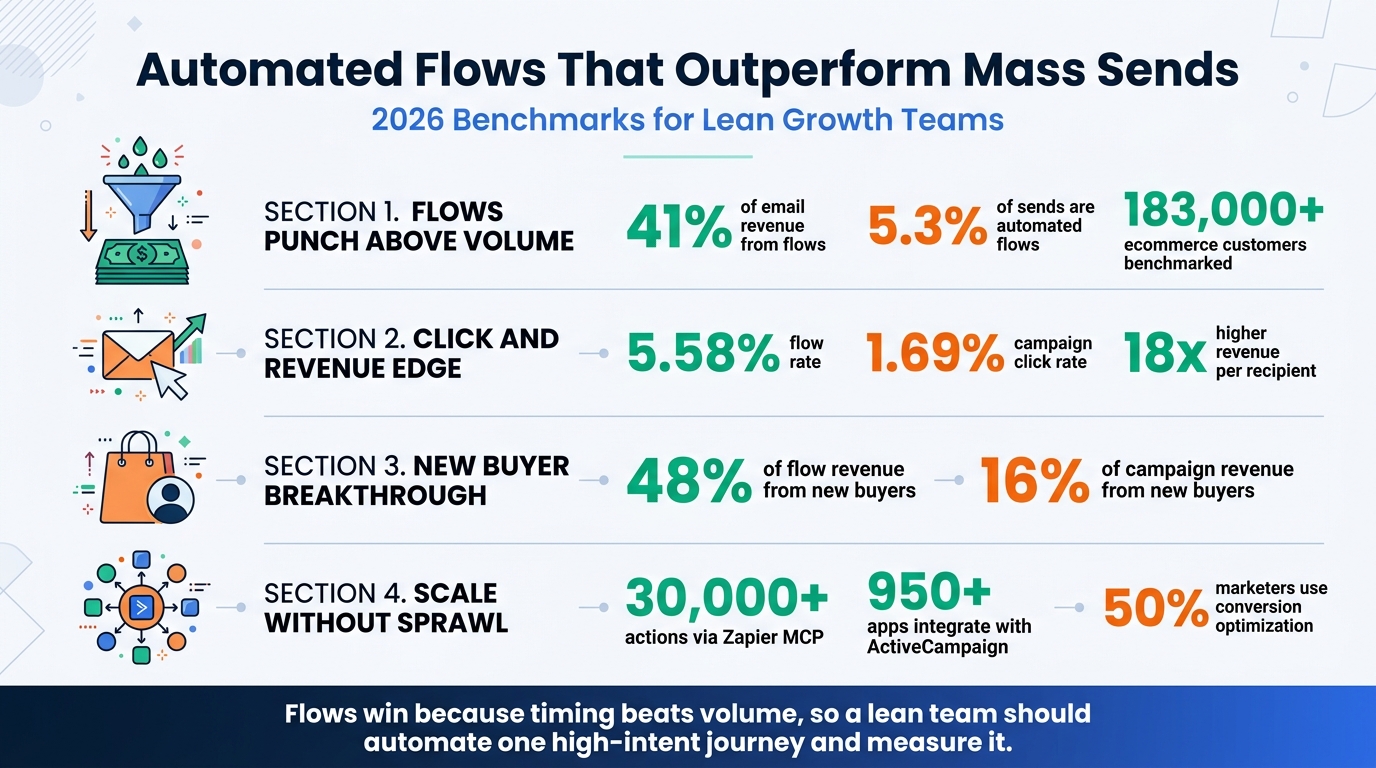
Automation Flow Impact Statistics for Growth Teams
Microsoft Power Automate – best if your team already runs on Microsoft 365
Power Automate covers cloud flows, desktop flows and process mining. Microsoft's 2026 release plan lists AI agent authoring, optimization and self-healing for desktop flows, Copilot Studio actions in cloud flows and consolidated governance reporting. [5]
Adopt when your data lives in Microsoft 365 or Dynamics. Otherwise it is usually overkill for an early-stage team.
Microsoft Copilot Studio – best for building AI agents on top of workflows
Microsoft's 2026 release plan lists agent building, high-value AI actions, multi-agent orchestration, evaluations and deeper governance for Copilot Studio. [5]
The plan also lists granular Copilot credit usage with pay-as-you-go caps in the Power Platform Admin Center. [5]
Adopt when you have a repeatable process that needs judgment, like classifying inbound requests, not just moving data.
All-in-one platform vs connected stack: which fits your startup
| Setup option | Data management | Specialized depth | Cost driver | Upkeep burden | Best for |
|---|---|---|---|---|---|
| All-in-one, such as HubSpot | Single CRM record | Good for scoring and routing | Contacts and edition tier | Lower sync work, higher process discipline | Teams with a sales follow-up motion |
| Messaging plus connector, such as ActiveCampaign + Zapier | Sync between apps | Strong for lifecycle messages and app connections | Contacts plus tasks | Medium: watch task use and field mapping | Lean SaaS teams without a full CRM |
| Visual builder plus specialist, such as Make + Klaviyo | Visual scenario with branches | Strong for complex logic and ecommerce flows | Tool plans and message volume | Higher: versioning and error handling needed | Ecommerce or ops-heavy workflows |
Hidden costs decide the budget. Task-based usage and contact-based pricing can add up, while duplicate records across tools and failed scenarios create extra upkeep. [1][4] Microsoft's release plan also lists granular Copilot credit usage with pay-as-you-go caps. [5] Make's help center includes error-handling guidance. [2]
If more than half of your planned workflows touch CRM records, start all-in-one. If they mostly move data between existing apps, start with a connector.
Five starter workflows for a lean growth team
Automate the right tasks first: frequent tasks, data you move between apps, manual tasks that will not scale as you grow, and tasks where AI would improve the output. [1]
Build in small loops: define the outcome and the apps, choose the trigger, choose the action or actions, map the fields, test with sample data, check the destination app, then publish. [1]
- Capture and qualify a lead. New form → create CRM contact → add source tag → assign owner.
- Route high-intent prospects fast. Pricing-page visit or trial signup → score → Slack alert to founder or sales.
- Onboard new users. Signup → welcome email → day-3 how-to → day-7 case study → check activation.
- Recover abandoned signups or carts. Started but did not finish → reminder → incentive → support nudge.
- Alert when a KPI moves. Log your weekly StartupRanking SR Score and referral traffic from directory listings in a sheet, then trigger a Slack alert when either drops.
Give each workflow one success metric — activation, reply rate or recovery rate. HubSpot's State of Marketing Report 2026 says 50% of marketers use conversion-rate optimization, one point behind audience segmentation refinement. [7]
Conclusion: build the smallest stack that proves one result
Match each tool to a clear job instead of collecting overlapping subscriptions. Klaviyo's ecommerce data shows that lifecycle flows can outperform one-off sends, so consider which repeatable messages matter most to your own funnel. [6]
Watch usage-based costs and upkeep from the start. Ship one workflow, measure it for two weeks, then expand what worked.
Pair your automation with visibility: register your startup on StartupRanking, and use AutoRankr if you want SEO articles published on autopilot.